
10 Tips for Buying an EV Charging Station with a Big Screen

Time:2026-10-30 Author:Charlotte
0%

Buying an EV charger with a large display is about more than screen size. An Ev Charging Station Big Screen should make everyday charging easier, not add another confusing interface to your garage or driveway. Imagine checking charging status while carrying groceries, or adjusting a setting in bright afternoon sun. Those small moments reveal whether a screen is genuinely useful.

Before comparing models, consider where the charger will be installed and who will use it. A bright, readable display can help, but glare, tiny text, and complicated menus can quickly undermine it. Small detail. Check that the unit supports your vehicle’s connector and charging needs, and compare its power rating with your home’s electrical capacity. Cable length matters too; a short cable may not reach a convenient parking position. Look for clear information about weather resistance, installation requirements, warranty coverage, and customer support. These details are less exciting than a touchscreen, but often matter more over time.

Smart features deserve a careful look. Review what the screen actually shows, whether scheduling is straightforward, and whether the charger depends on an app or internet connection. Ask how software updates and data handling are described by the manufacturer. A polished display alone is not proof of quality. Compare published specifications with credible reviews, and confirm installation details with a qualified professional when needed. This guide explores ten practical checks to help you weigh screen usability, charging performance, reliability, and long-term value. Some choices will depend on your routine; there may be no perfect model.
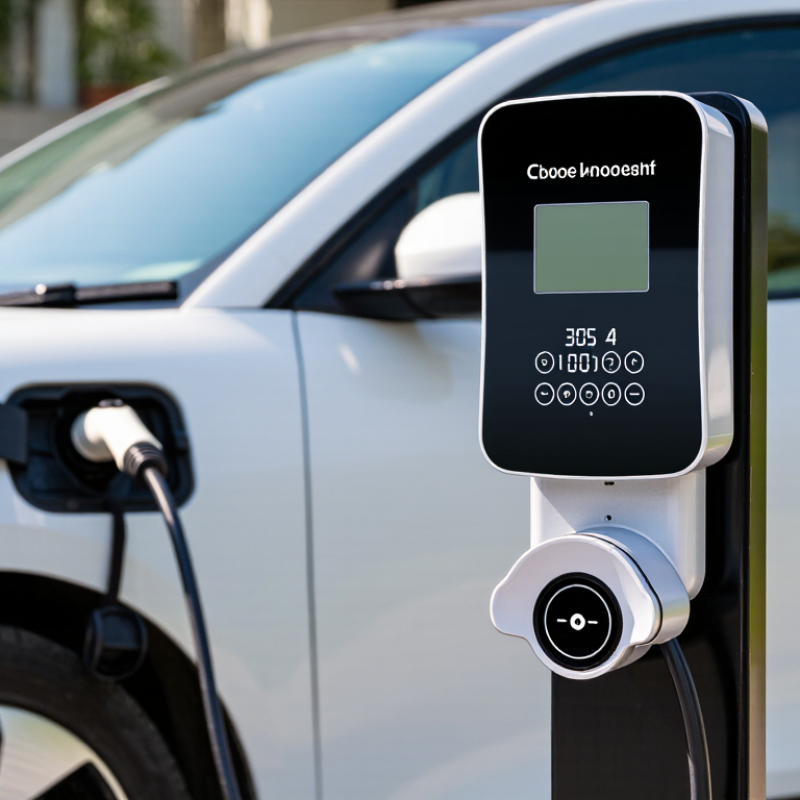
10 Tips for Buying an EV Charging Station with a Big Screen

Identify Your Charging Needs and Installation Conditions

Begin with the car, not the screen. Note your usual daily mileage, overnight parking time, and whether other household vehicles may need charging. The U.S. Department of Energy’s Alternative Fuels Data Center gives typical Level 2 charging rates as 10–30 miles of range per hour, compared with 2–5 miles for Level 1. Match the charger to your real routine; a larger screen cannot compensate for a circuit that charges too slowly. Measure twice.

Check the installation spot in daylight and after dark. A charger beside the garage door may be convenient, but a long cable can cross a walkway or fail to reach the vehicle’s inlet. Ask a qualified electrician to assess panel capacity, circuit requirements, cable routing, and exposure to rain or direct sun. The screen should be readable from where you stand, without glare making its numbers hard to see. Confirm that its menus remain usable if the Wi-Fi signal is weak.

Consider your backup options, too. The International Energy Agency’s Global EV Outlook 2024 reports that public charging points grew by more than 40% worldwide in 2023. That growth may help drivers without reliable home charging, but it does not replace checking local access and cost. I would still test the screen’s brightness and controls in person when possible. Specs can miss the annoyance of a reflective panel or tiny text.

Evaluate Screen Size, Readability, and User Interface

Screen size is not a shortcut to usability. A large display can show charging status, session time, and energy delivered without crowding them, but it must be readable from where drivers naturally stand. Check the panel in bright daylight and after dusk. Glare, reflections, or dim text can make a generous screen frustrating. That matters. Look for adjustable brightness and strong contrast, especially for an outdoor installation. Icons should be distinct, and labels should not depend on color alone.

The interface should answer simple questions quickly: Is the connector active? Has charging started? What should I do if it pauses? Try the menus with one hand, or with light gloves if that suits your climate. Tap targets should be large, and essential actions should not sit several screens deep. A helpful layout puts status and next steps ahead of decorative graphics. Check the screen from an angle, too; drivers rarely stand perfectly centered. One detail is easy to miss: touchscreens may respond differently in cold weather or with damp fingers. Test responsiveness in realistic conditions, not only during a showroom demonstration. Even a clear interface may take a little time to feel familiar. Worth considering.

10 Tips for Buying an EV Charging Station with a Big Screen — Evaluate Screen Size, Readability, and User Interface

# What to Evaluate Practical Guidance What to Check Before Buying
1 Screen size A screen around 7–10 inches can provide room for clear instructions, charging status, and payment prompts. A larger display is not automatically easier to use. Check the visible display area and confirm that key information remains legible from the usual standing distance.
2 Outdoor brightness Direct sunlight can make a display difficult to read. Higher brightness and an effective anti-glare surface can help, though performance depends on the screen and installation conditions. Ask for the display brightness specification, commonly stated in nits, and view a working unit in bright outdoor light if possible.
3 Text size and contrast Strong contrast, plain fonts, and short instructions make important information easier to scan. Avoid interfaces that rely on small text or color alone. Check that charging progress, price, errors, and next steps are readable without needing to stand very close.
4 Viewing angle A wide viewing angle helps users read the screen while standing to the side or approaching the charger from different directions. Review the manufacturer’s viewing-angle information and test readability from more than one position.
5 Touch response Buttons should be easy to select, with enough spacing to reduce accidental taps. A large screen is most useful when its touch controls are responsive. Try the main actions, such as choosing a language, starting a session, and confirming a payment method.
6 Glove and wet-weather use Users may operate a charger outdoors in cold or wet conditions. Touchscreen behavior can vary with gloves, moisture, and screen technology. Ask whether the interface has been tested with common gloves and whether the screen can be operated reliably when damp.
7 Clear session information A helpful display shows relevant details such as charging state, elapsed time, delivered energy, estimated cost when available, and how to stop the session. Confirm which details appear during charging and whether prices and units are presented clearly for the intended users.
8 Simple screen flow A straightforward sequence—connect, authenticate or pay, start, and monitor—can reduce confusion. Avoid unnecessary menus and repeated confirmations. Walk through a complete sample session and note how many steps are needed before charging begins.
9 Languages and accessibility Multiple language options can help serve a wider range of drivers. Clear labels, readable text, and instructions that do not depend only on color improve usability. Check supported languages, text scaling options if offered, and whether essential instructions remain understandable without sound.
10 Durability and serviceability An outdoor display should be designed for its installation environment. Weather exposure, temperature range, cleaning, and replacement support can affect long-term usability. Review the environmental ratings, operating-temperature range, warranty coverage, and process for repairing or replacing the screen.

Check Charging Speed, Connector Type, and Vehicle Compatibility

A large screen can make an EV charger easier to use, but it does not make the charger faster. Compare its rated output in kilowatts with your vehicle’s maximum AC charging rate. If the charger supplies more power than the car can accept, the car usually sets the limit. Check the label.

Also consider your electrical supply. A unit rated for high output may need a suitable circuit and professional installation. Ask an installer to assess the wiring before you buy; a product specification alone cannot confirm what your home can support.

Connector compatibility matters just as much. Check the charging inlet and owner’s manual for your exact vehicle and model year. Connector standards vary by region, and an adapter is useful only when it is approved for the vehicle and charging setup.

That detail is easy to overlook. The charger’s screen should clearly show charging power, session time, and any connection error. Imagine arriving home in the rain: large text and simple status messages are more useful than decorative graphics.

Still, screen quality is secondary if the cable cannot reach your parking spot or the connector does not fit. Measure the distance from the planned mounting point to the car’s inlet, then allow a little slack.

Compare Smart Features, Safety Protections, and Connectivity

A large screen is useful only when its readings are clear in sunlight and at a glance. Check that it shows charging status, power, session time, and fault alerts without burying them in menus. Try the touchscreen with gloves if you charge outdoors. Screens can distract.

Tip 1: Compare display readability and simple physical controls, not screen size alone.

Tip 2: Review safety protections before smart features. Look for recognized independent safety certification, ground-fault protection, over-temperature monitoring, and a cable that feels sturdy at the connector. Confirm the unit suits your electrical supply, and have installation requirements checked by a qualified electrician. The International Energy Agency reported that public charging points grew by about 40% in 2023, reaching roughly four million worldwide. That rapid expansion makes clear safety information and dependable fault alerts worth checking.

Tip 3: Check connectivity details. Ask whether Wi-Fi is required, whether charging still works during an internet outage, and how firmware updates are delivered. Review what usage data the station stores and whether settings remain available on the unit itself. App features can be handy, but a connection that drops at the wrong moment is frustrating. I would not choose a charger on screen polish alone; honestly, comparing support terms takes more patience than expected.

Assess Total Cost, Warranty Coverage, and Ongoing Support

An EV charging station with a large screen can look affordable until installation costs appear. Request a written quote that separates the unit, wiring, labor, and any site-specific work. An older electrical panel may need an upgrade, while a long cable route can add installation time. Check for recurring network fees and possible costs for screen, cable, or connectivity repairs. Those small lines matter.

Read the warranty before comparing models. Confirm how long parts and labor are covered, and whether the display, cable, and internal electronics have different terms. Ask what could void coverage, such as damage from improper installation. A warranty may cover a failed screen but not the technician’s visit. That distinction can change the real cost. Keep the documents.

Ongoing support matters after the charger is mounted and working. Ask how to reach a technician, what response times are typical, and whether troubleshooting is available by phone. Find out how software updates are delivered and whether older units continue receiving them. If the screen freezes on a cold morning, clear guidance is useful. I would not assume every support promise is guaranteed; request the terms in writing and check how service requests are handled.

FAQS

Is a larger screen always easier to use?

Not always. Check whether charging status, session time, and energy delivered are readable in daylight and after dusk. Glare can make a large display hard to read.

What should I test on the screen before choosing a charger?

Try the menus from an angle and with one hand. If you use gloves outdoors, test the touchscreen with them. Cold weather and damp fingers may affect responsiveness.

Which information should be easy to find?

Look for clear charging status, power, session time, and fault alerts. The next step should be visible without digging through several menus. Simple icons help.

Which safety protections are worth checking?

Look for independent safety certification, ground-fault protection, and over-temperature monitoring. Check that the cable and connector feel sturdy. Have a qualified electrician confirm the unit suits your electrical supply.

Will charging still work if the internet connection drops?

Ask whether Wi-Fi is required for charging. Check which settings remain available on the unit and how software updates arrive. A dropped connection can be frustrating.

What costs should I include beyond the charger price?

Request a written quote separating the unit, wiring, labor, and site-specific work. An older electrical panel or a long cable route can add costs. Check for recurring network fees, too.

What should I check in the warranty?

Compare coverage for parts and labor, and check whether the screen, cable, and electronics have different terms. Ask whether a service visit is covered. Keep the documents.

How can I judge the quality of ongoing support?

Ask how to contact a technician, typical response times, and how service requests are handled. Find out whether older units still receive updates. I would not assume every promise is guaranteed; get the terms in writing.

Conclusion

Choosing an Ev Charging Station Big Screen starts with understanding your daily charging needs, where the unit will be installed, and what electrical conditions are available. Consider whether the charger is intended for indoor or outdoor use, how easily it can be reached, and whether its screen will remain clear and readable in the surrounding light. A straightforward interface can make it easier to check charging progress, adjust settings, and understand alerts.

Next, confirm that the charging speed, connector type, and vehicle compatibility fit your needs. Compare useful smart features and connectivity options, while checking for appropriate safety protections and reliable operation. Finally, look beyond the upfront price: consider installation expenses, warranty coverage, and the availability of ongoing support. Weighing these factors together can help you select a screen-equipped charger that is practical, easy to use, and suited to your home and vehicle.

Charlotte

Charlotte

Charlotte is a seasoned marketing professional with a deep understanding of the company's portfolio and a passion for elevating its presence in the market. With a keen eye for detail and a commitment to excellence, she ensures that our professional blog is regularly updated with insightful articles......